What the Exam Reader speeds up
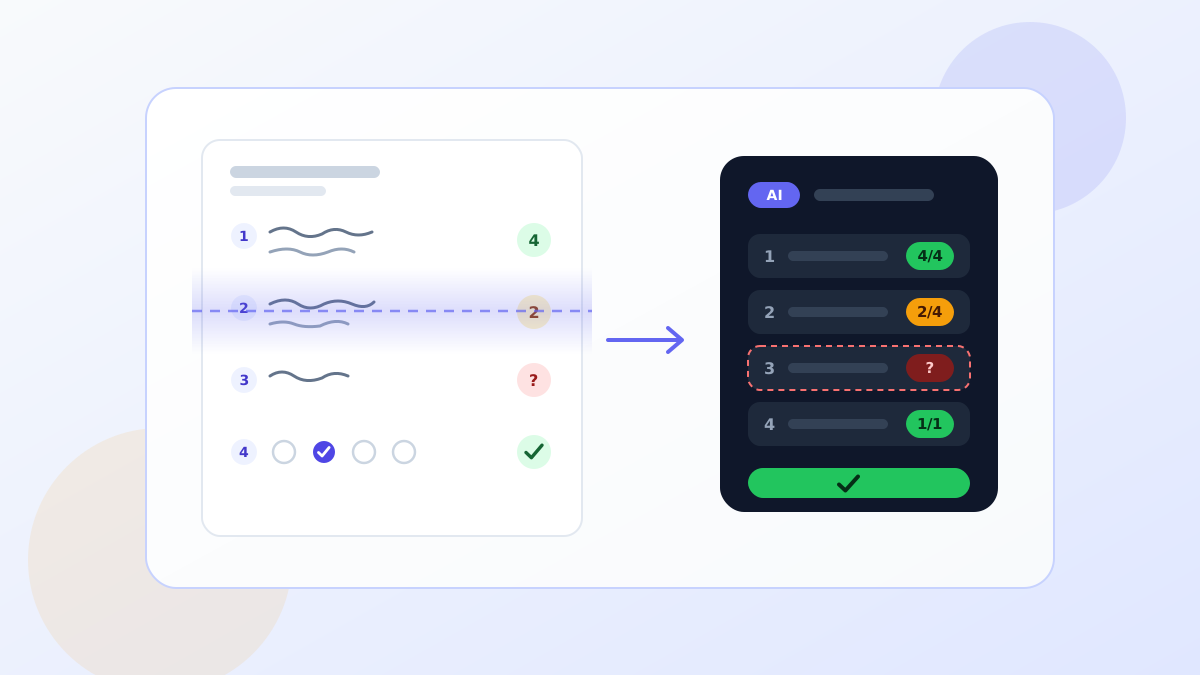
Paper exams create useful evidence, but they also create repetitive work: reading every answer, entering scores, checking totals, and summarizing class performance. TeinGo Exam Reader moves that workflow into one place. You upload exam pages, define the answer key or rubric, and review AI-assisted scoring suggestions before anything is finalized.
The goal is not to remove teacher judgment. The goal is to reduce mechanical checking so teachers can spend more time on feedback, reteaching decisions, and fair review.
How to prepare the exam
- Keep question numbers clear and consistent.
- Use short rubric criteria for open-ended answers.
- Separate the answer key from student work when possible.
- Upload scans or photos where the full page is visible.
Why teacher approval stays in the loop
AI is most useful as a first reading layer. Handwriting, partial photos, crossed-out work, and ambiguous reasoning still require professional judgment. TeinGo keeps review controls visible, so you can adjust scores, check flagged answers, and keep final responsibility with the teacher.
Using the report after grading
Once papers are reviewed, the report can show strong areas, common mistakes, and question-level patterns. That turns the exam from a scoring task into a planning tool for the next lesson.
Explore the AI exam reader page and build your first review workflow.
What the classroom workflow looks like
A practical workflow starts before the exam is scanned. The teacher prepares the paper, defines point values, and writes the rubric for open-ended answers. After the exam, pages are scanned or photographed and uploaded into one review session. TeinGo keeps each paper connected to that session, so it is clear which papers are unread, which need review, and which have been approved.
Rubric quality matters most for open-ended questions. Criteria such as “4 points for a complete answer with reasoning, 2 points for a correct method with a calculation error, 1 point for the right concept but incomplete work” give the AI a clearer first reading target. The suggestion should still be treated as a draft for teacher review.
Example rubric structure
| Answer state | Score | Review note |
|---|---|---|
| Complete correct answer with reasoning | 4 | Method and result are aligned. |
| Correct method with a small error | 2-3 | Teacher checks the final score. |
| Relevant concept but incomplete work | 1 | Feedback names the missing step. |
| Blank or unrelated answer | 0 | Flag for human review if unclear. |
Before-you-upload checklist
- Make sure the student name, number, or matching field is visible.
- Retake photos that are cropped, shadowed, or strongly tilted.
- Keep page order consistent for multi-page exams.
- Write short rubric criteria that do not repeat the same idea.
- On the first run, compare several AI suggestions with manual scoring.
Where AI needs careful review
Crossed-out work, two competing answers on the same page, low-light photos, and answers spread across multiple areas may require teacher judgment. In those cases, automation should not mean automatic approval. It should mean the teacher reaches a better decision faster.
Use the report beyond grading
The most valuable output is not only the final score. Question-level patterns show which learning outcomes need reteaching. Individual growth notes can become feedback, while common class errors can become the next worksheet, mini-lesson, or review activity.

Leave a Comment